Downloads and detailed instructions for starting the game.
1 STEP | |
Download our client from one of the links below. We highly recommend using our client to avoid errors or connection issues. However, a modern Rose client will also work. |
2 STEP | |
After installing the client, extract it to an empty folder. Then download our patch and extract its contents to the corresponding folders in your client directory. You can change languages using the launcher. |
3 STEP | |
We highly recommend installing our launcher to automatically keep your game updated! Simply unzip the launcher into the main directory of your game client and run it. The launcher will scan your client files and update them automatically. The launcher also supports auto-login (enter your username and password). |
4 STEP | |
To play on Age of Splendor, you must first register a master account. After creating your master account, you can then create your game account. Your master account will hold all of your game accounts. Remember your account details and have fun! |
5 STEP | |
In order to keep up with the latest updates and communicate with our community, join our Discord server! You will be able to contact staff and other members alike. |
6 STEP | |
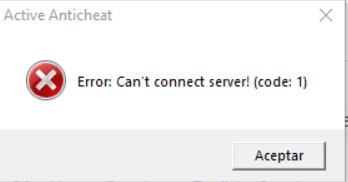
If you are experiencing this error from Active Anticheat, we recommend installing Cloudflare's WARP. This error is most likely caused by a connection issue between your internet provider and our server's protection. Please contact our staff on Discord for assistance. |

 Drive A
 Yandex
 Torrent
 Mediafire
 Mega
Mega